Outbound Filter - Mail Approval
The Mail Approval page configures the policies that require outbound mail to pass administrator approval before it leaves the organization. Approved messages are delivered; rejected messages stay in the Outbound Approval mailbox.
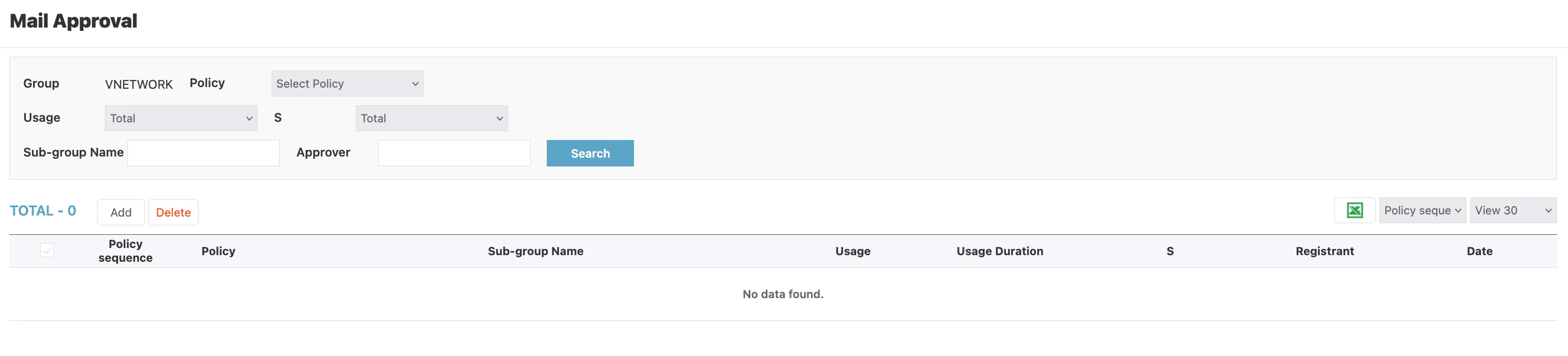
Page Layout
The page header reads Mail Approval.
Search Criteria
A multi-field search bar:
| Field | Purpose |
|---|---|
| Group | Static label showing the current group (for example VNETWORK) |
| Policy | Select Policy dropdown — narrow to a specific policy |
| Usage | Dropdown (default Total) — filter by whether the policy is Used |
| S | Dropdown (default Total) — filter by the policy status flag |
| Sub-group Name | Free-text input — narrow by sub-group |
| Approver | Free-text input — narrow by who approves the mail |
A blue Search button applies the filters.
Action Bar
A counter (for example TOTAL - 0) is followed by:
| Element | Purpose |
|---|---|
| Add | Open the Add Approval Policy dialog |
| Delete | Delete the policies selected by the row checkboxes |
| Excel icon (green) | Export the policy list to Excel |
| Policy sequence dropdown | Change the column the table sorts by |
| View 30 | Page-size dropdown |
Columns
| Column | Description |
|---|---|
| ☐ | Row selection checkbox |
| Policy sequence | Order in which the policy is evaluated — lower numbers run first |
| Policy | Policy name |
| Sub-group Name | Sub-group the policy applies to |
| Usage | Whether the policy is currently active (Used / Not Used) |
| Usage Duration | The window during which the policy is active |
| S | Status flag |
| Registrant | Administrator who created the policy |
| Date | Timestamp the policy was created or last modified |
How Approval Works
Outbound mail that matches a Mail Approval policy is held in the Outbound Approval mailbox with status Waiting approval. The named Approver receives a notification and can then approve or reject the message:
- Approve — the message is released for delivery; status moves to
ApprovalthenSending Complete - Reject — the message is blocked; status moves to
Reject
If the approver does nothing, the message stays in the queue indefinitely until acted upon.
Policy Sequence Matters
When multiple policies match the same sender, the policy with the lowest sequence number wins. Order policies from most-specific to most-general:
- Per-user exceptions (sequence 1-9)
- Per-sub-group rules (sequence 10-99)
- Group-wide defaults (sequence 100+)
Use the Excel export to audit the full policy list before making bulk changes — the Web UI shows only one page at a time.
A policy with Usage = Used but no active Approver assigned will hold mail indefinitely. Always verify that the named approver is reachable and willing to monitor the queue.