Group Outbound Status
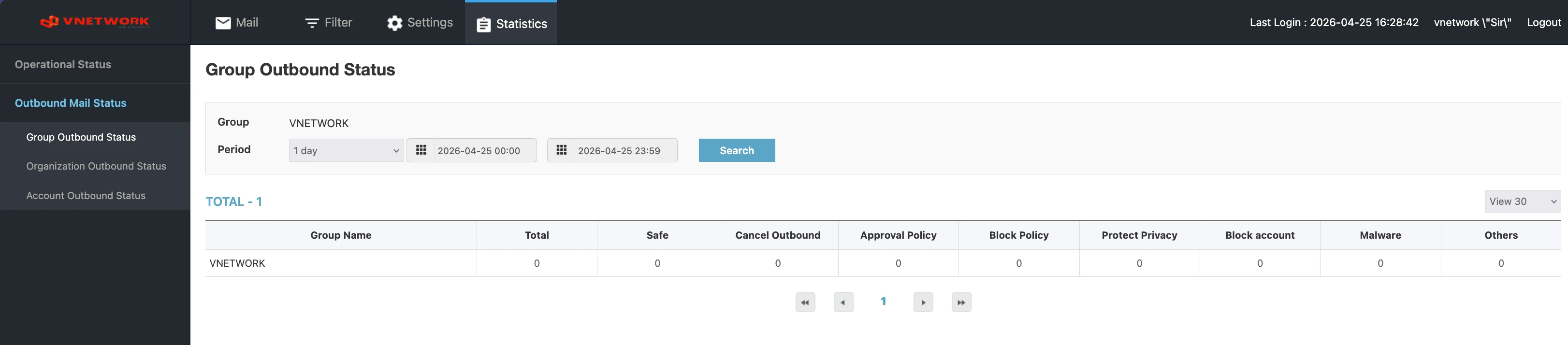
The Group Outbound Status page reports outbound mail counters for the entire group as a single row.
Page Layout
The page header reads Group Outbound Status.
Filters
| Field | Purpose |
|---|---|
| Group | Static label showing the current group (for example VNETWORK) |
| Period | Period preset (1 day, 1 week, 1 month, etc.) |
| Start datetime | Start of the reporting window |
| End datetime | End of the reporting window |
| Search (blue) | Apply the filters |
Columns
| Column | Description |
|---|---|
| Group Name | Name of the group |
| Total | Total outbound messages |
| Safe | Messages classified as Safe and delivered |
| Cancel Outbound | Messages cancelled by the sender or administrator |
| Approval Policy | Messages routed to approval and released |
| Block Policy | Messages blocked by an outbound block policy |
| Protect Privacy | Messages blocked or held by a PII Protection policy |
| Block account | Messages blocked because the sending account was suspended |
| Malware | Messages blocked because they contained malware |
| Others | Messages that did not fall into any of the above categories |
A pagination control sits at the bottom of the table and a View 30 dropdown on the right controls page size.
When to Use This Page
The single-row view is the right starting point when you want the headline outbound numbers without breaking them down further. For deeper analysis, drill down to:
- Organization Outbound Status — split the same numbers by organization
- Account Outbound Status — split by individual mail account
tip
Compare the Total here with Outbound Operation Status > Total on Operational Status for the same period — they should match. A discrepancy usually means a domain filter is set on one of the two pages.