Managed Kubernetes
Managed Kubernetes provisions and operates Kubernetes clusters for you — the control plane,
worker node pools, ingress, cluster add-ons and auto-scaling — on VNETWORK's
OpenNebula platform. You keep standard kubectl / Helm workflows; VNETWORK runs the masters,
patches the platform and gives you a downloadable kubeconfig.
When to use it
Use Managed Kubernetes to run containerised applications at scale without operating the control plane yourself. Clusters draw their CPU, memory and storage from your Cloud Compute service, so a Compute service is a prerequisite.
Activate
Managed Kubernetes is self-serve from the Partner Portal:
- Open Services → Kubernetes → Managed Kubernetes.
- If you don't have a Cloud Compute service yet, you're prompted to activate that first — Kubernetes runs on top of it.
- Click Activate Managed Kubernetes. VNETWORK provisions the Kubernetes service linked to your Compute service.
Once activated, the console opens on the service dashboard (a service picker appears first if you have more than one Kubernetes service).
The console & navigation
The console has two navigation scopes:
Service scope — everything in one Kubernetes service:
- Dashboard — cluster / network / resource counts and recent clusters.
- Clusters — create and manage clusters.
- Networks — the subnets clusters attach to.
- Resources — workloads and objects across clusters.
- Settings — rename, cancel or delete the service.
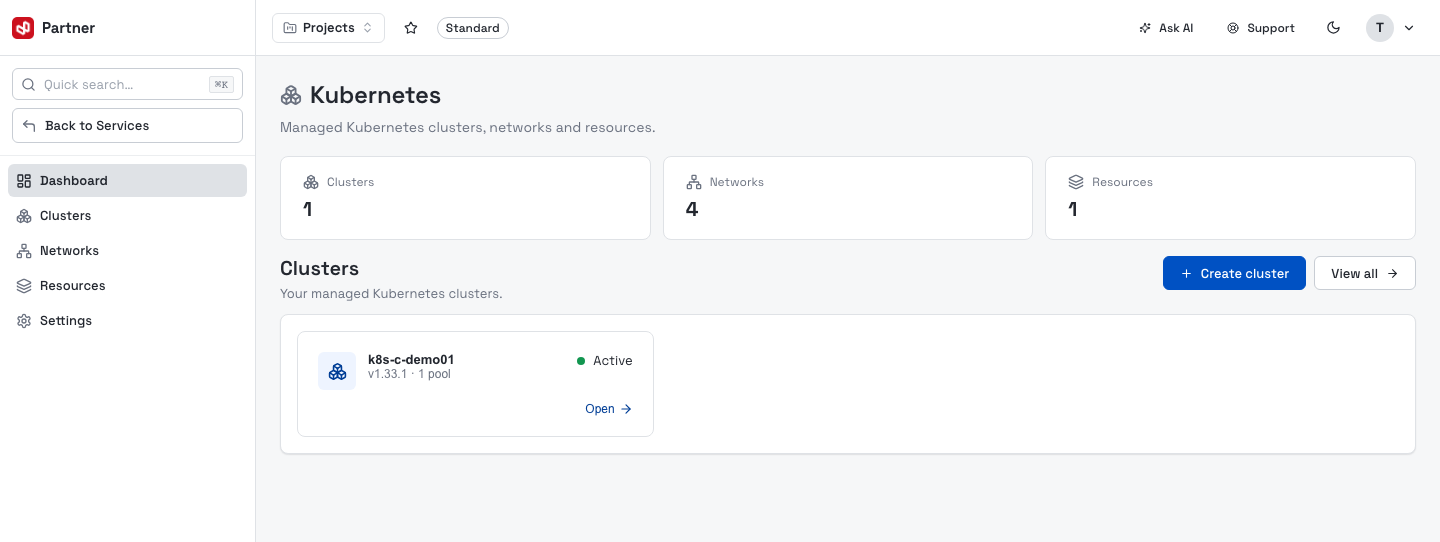
Cluster scope — opening a cluster swaps the sidebar to its sub-sections: Overview, Metrics, Node pools, Nodes, Instances, Ingress, Snapshots, Logs, Settings — with a Back to clusters link.
Concepts
| Concept | What it is |
|---|---|
| Service | One Managed Kubernetes subscription, linked to a Cloud Compute service; holds your clusters, networks and resources. |
| Cluster | A Kubernetes cluster — a managed control plane plus one or more worker node pools. |
| Node pool | A group of identically-sized worker nodes (a flavor + scaling range) that schedule your workloads. |
| Network | A private subnet (CIDR) that clusters attach their nodes to. |
| Add-on | An optional component installed into the cluster (ingress, metrics, cert-manager, monitoring, storage…). |
Every cluster page has a Download KubeConfig button. Set the client-certificate lifetime under the cluster's Settings before downloading — see Cluster settings.
In this guide
- Clusters — the cluster list and the create wizard.
- Cluster detail — overview, metrics, nodes, instances, snapshots, logs and settings.
- Node pools — add, edit, scale and manage worker pools.
- Ingress — the ingress controller, backends and port forwarding.
- Networks — subnets and cluster resources.
- Service settings — rename, cancel or delete the service.
- FAQ.