Ingress
The Ingress tab shows the cluster's ingress controller and load balancer. Change gateway (top right) picks which ingress load balancer the console monitors when a cluster runs more than one controller.
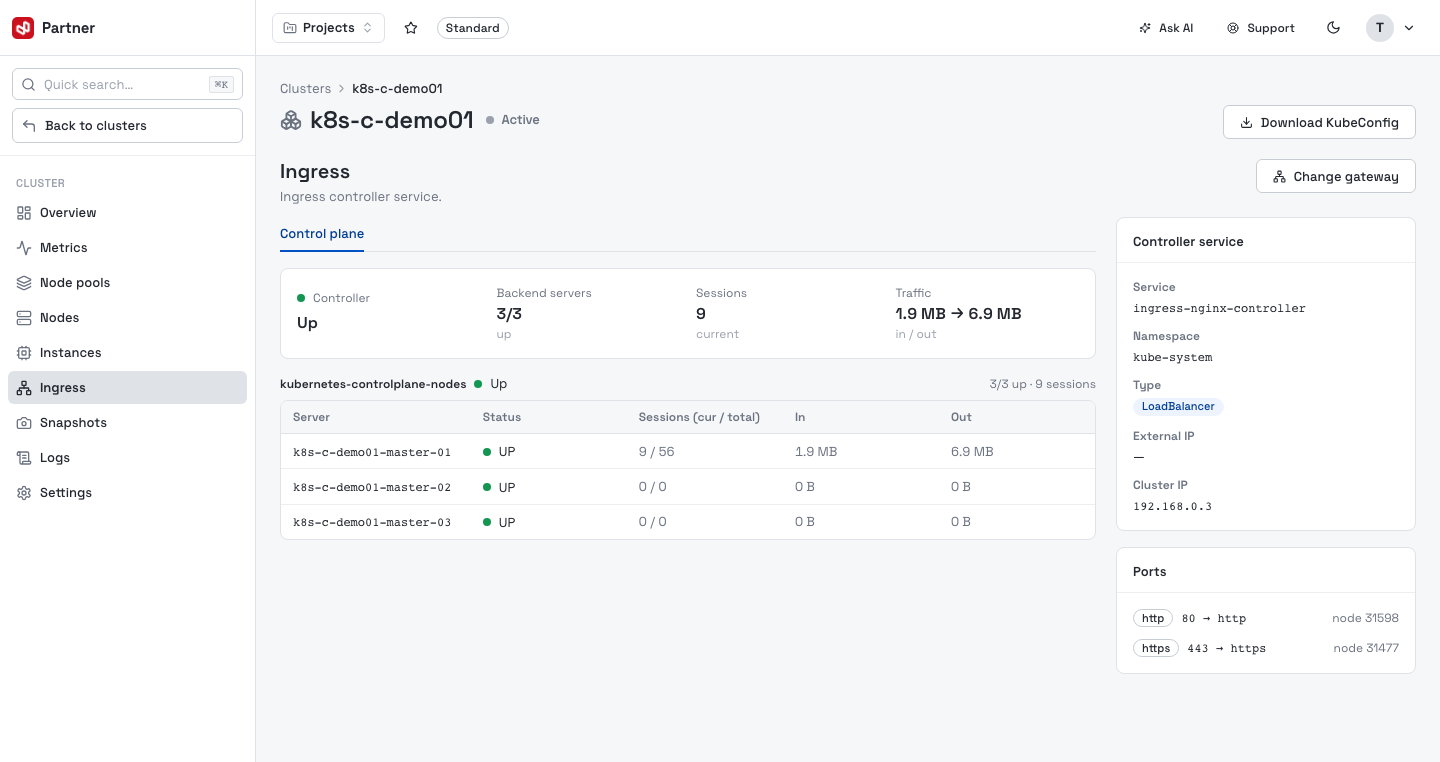
The right rail describes the controller: Controller service (name, namespace, type,
external / cluster IP) and the exposed Ports (each port → targetPort with its
nodePort). The Control plane view lists backend servers with per-server Status,
Sessions and In / Out traffic.
When the ingress is exposed through a LoadBalancer, extra tabs appear:
- Statistics — controller status, backend-server health and live traffic.
- Monitoring — utilisation charts for the load balancer.
- Port forwarding — expose raw TCP/UDP ports straight to worker nodes (below).
The Load balancer rail card also offers Resize (a bigger/smaller flavor):
Resizing the ingress load balancer briefly powers it off — ingress traffic pauses during the swap. Resize during a maintenance window.
Port forwarding
On a LoadBalancer ingress, Port forwarding exposes a public TCP/UDP port directly to selected worker nodes — an L4 path separate from the HTTP ingress rules. Quick forward port opens a dialog to set the Protocol (TCP/UDP), Public port and Node port, and to pick which worker nodes receive the traffic.
Existing forwards are listed as cards (protocol, port, backend node count); expand one to see its backend nodes, and the delete icon removes it.
Deleting a forward immediately stops traffic reaching the worker nodes on that port.